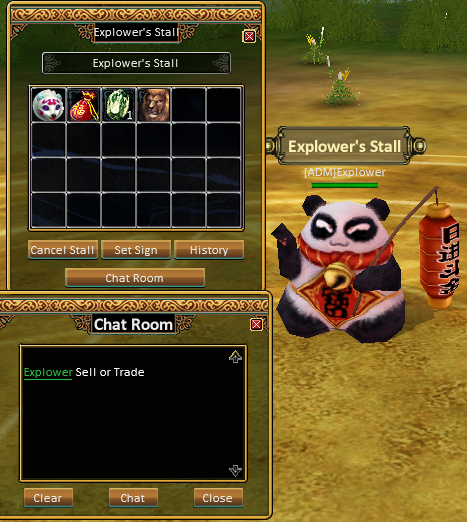


Player Stall (also known as My Stall) is a trading feature that allows players to open their own shop and sell items directly to other players. This system functions as a personal marketplace where players can display items and set their own prices.
The stall system is one of the main ways players trade equipment, materials, and other items without using the auction system.
Requirements
To use the Stall system, a character must meet the following requirement:
-
The character must be Level 10 or higher.
Once this requirement is met, the player can open a stall and begin selling items.
Where Stalls Can Be Used
Player stalls can be created only in safe areas, such as towns or non-combat zones.
Common places where players open stalls include:
-
City centers
-
Market areas
-
Near teleport locations
-
Near Auctioneer NPCs
These locations usually have high player traffic, which increases the chance of selling items.
How to Set Up a Stall
To create a player stall:
-
Open the My Stall interface using the stall icon near the minimap.
-
The Stall window and Item Box will appear.
-
Drag items from your inventory into the empty stall slots.
-
Set the price for each item.
-
(Optional) Use Set Sign to give your stall a custom name.
-
Start the stall and wait for other players to browse your items.
Players can sell many types of items including equipment, gems, crafting materials, and other tradable items.
Stall Behavior
While the stall is active:
-
The character automatically sits down in stall mode.
-
The player cannot move, fight monsters, or perform other gameplay actions.
-
Other players can interact with the stall and view the items for sale.
This system allows players to sell items while staying online in a marketplace area.
Buying from a Player Stall
Other players can buy items from a stall very easily:
-
Right-click on the character who opened the stall.
-
The stall window will open showing all items and prices.
-
Select the item and purchase it directly.
If the item is purchased, the payment is automatically added to the seller's Item Box.
Players can also leave messages in the stall chat room to negotiate prices.
Stall Features
The stall system includes several useful features:
Custom Stall Name
Players can set a custom title for their stall to attract buyers.
Chat Room
Visitors can leave messages asking about prices or requesting discounts.
Sales History
The stall interface includes a History option that allows players to review completed sales.
Role in the Game Economy
The Player Stall system plays an important role in the in-game economy. It allows players to:
-
Sell unused equipment and items
-
Buy cheaper items directly from other players
-
Trade crafting materials and gems
-
Create player-run marketplaces in towns
Together with the Auction House and direct trading, the stall system forms one of the core trading methods in the game.